Showing posts with label Excel tips and tricks. Show all posts

Sunday, January 12, 2014

How to use Vlookup in Excel

Vlookup is one of the most useful Excel functions, yet one of the least understood.  The V here stands for vertical and lookup stands for the utility of the function.
Vlookup allows you to look for values in a table through columns (for rows Hlookup can be used, but, since most of our data is in Column form Vlookup will be the more frequently used of the two).
Lets go through a live example of Vlookup to understand it's use and how to run it.
Lets us consider table A, where marks in three subjects of some students are listed.
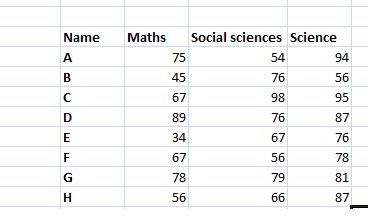
Sheet A
Now we have to find out marks of ' some ' of these students in table B shown below:
Sheet B
applying Vlookup
Sheet B-2
lookup_value : The value in Table B that has to be searched for in table A (select C in table B)
Table array: The table in which the value has to be searched for.Select the whole table A
col_index_num: The column number in the selected  table A from where the values will be picked up. Here it is two for now as we are looking for maths numbers.
range_lookup: Here we are given two choices True for approximate matches and false for exact matches. I have selected for exact matches in the above example
Sheet B-3
This is the result. Now we can just drag the formula to get results for the other fields.
I hope this article helps.

Tuesday, December 17, 2013

How to count rows/cells after the table is filtered:Excel

Suppose a table has x rows with values. We filter it for certain query and count the elements in  now filtered output. It still returns as the count. How do we count rows/cell in a filtered data?
Let us go through this example:
unfiltered
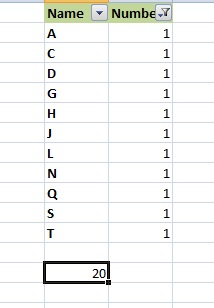
The COUNTA function returns the value to be 20.
Now if we I filter it for people with only number 1 .
filtered
The count is still 20.
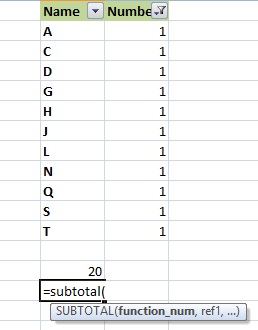
Now to count for how many people have  number A we will have to use the subtotal function.
subtotal-1
funtion_num is the function we want to use on the 'sub-data' that is the filtered table. Here we will select 3 i.e. COUNTA.
ref: select the data to be counted
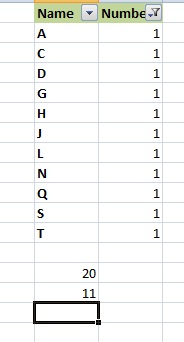
subtotal-2
So we get our subtotal to be 11.

Thursday, November 21, 2013

Picking up a few characters from cell:Excel

To pickup a certain few characters from a data entry in  a cell we have three different functions.
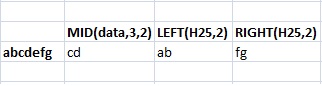
1. MID function : This function has three arguments to be entered. The cell from which the characters/string will be taken, the position of the string from where we want to start and the number of strings to be taken.
2. Left function: Only two arguments to be entered .The cell from which the characters/string will be taken and the number of characters be taken.
3. Right function: Starts from the right side. Syntax same as left.
Below is example of usage of all the three. with the functions and the results listed for each.
leftrightmid